🌐 Docker Networking
Containers don’t run in complete isolation forever — at some point they need to talk to each other, or to the outside world. That’s what Docker networking is all about. 🌐
🧠 How Does Container Networking Work?
When Docker runs a container, it creates a virtual network interface (eth0) inside that container. This interface connects to a virtual ethernet pair (veth) on the host, which then connects to the docker0 bridge — Docker’s built-in internal network switch.
That bridge then connects to the host’s real network interface (eth0), which reaches the internet.
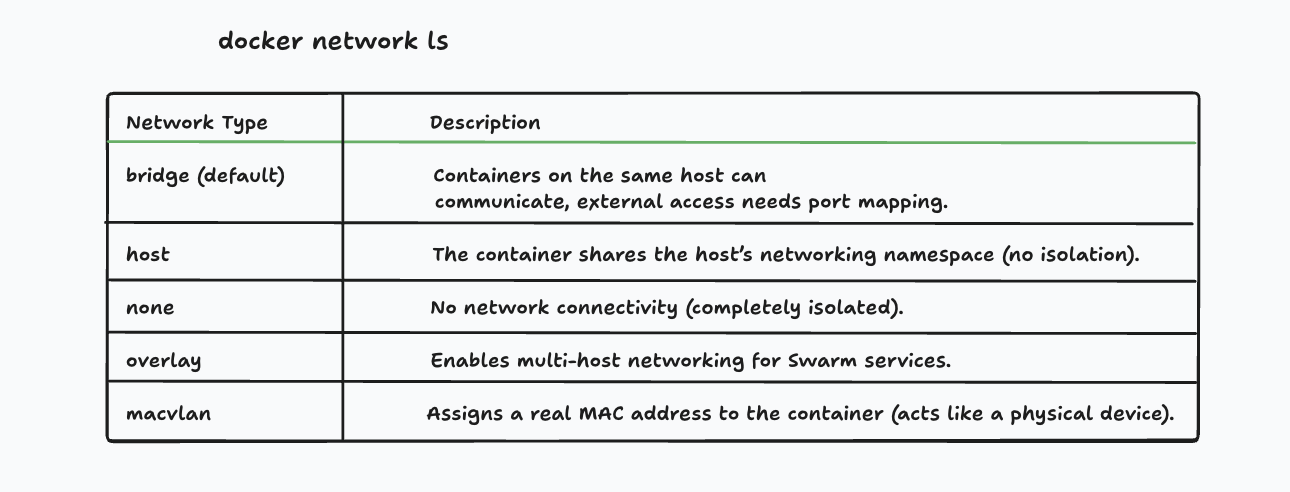
Reading the diagram:
- Each container has its own
eth0(virtual network card inside the container) veth1/veth2→ virtual cables connecting containers to the hostdocker0→ Docker’s bridge, the internal switch that routes traffic between containerseth0(bottom) → the host machine’s real network card, connecting to the internet
🗂️ Container Networking Models
Docker gives you different network drivers depending on how you want containers to communicate.
| Network Driver | What it does | Best for |
|---|---|---|
| bridge | Default. Containers on the same bridge can talk to each other. Isolated from host. | Most apps, development |
| host | Container shares the host’s network directly. No isolation. | Performance-sensitive apps |
| overlay | Connects containers across multiple Docker hosts (machines). | Docker Swarm / multi-server setups |
| none | No network at all. Complete isolation. | Maximum security needs |
🌉 Bridge Network (Default)
When you run a container without specifying a network, it joins the default bridge network automatically.
docker run nginxContainers on the same bridge network can communicate using their container IP addresses. However, containers on the default bridge cannot resolve each other by name — you need a custom bridge for that (covered below).
Check which network a container is on:
docker inspect <container-name>🖥️ Host Network
With host networking, the container shares the host machine’s network stack directly. There’s no port mapping needed.
docker run --network host nginxThe downside: no isolation. The container can see everything on the host network. Use carefully.
☁️ Overlay Network
Overlay networks connect containers running on different machines (different Docker hosts). This is mainly used with Docker Swarm for distributed applications.
docker network create --driver overlay my-overlay🛠️ Common Container Networking Commands
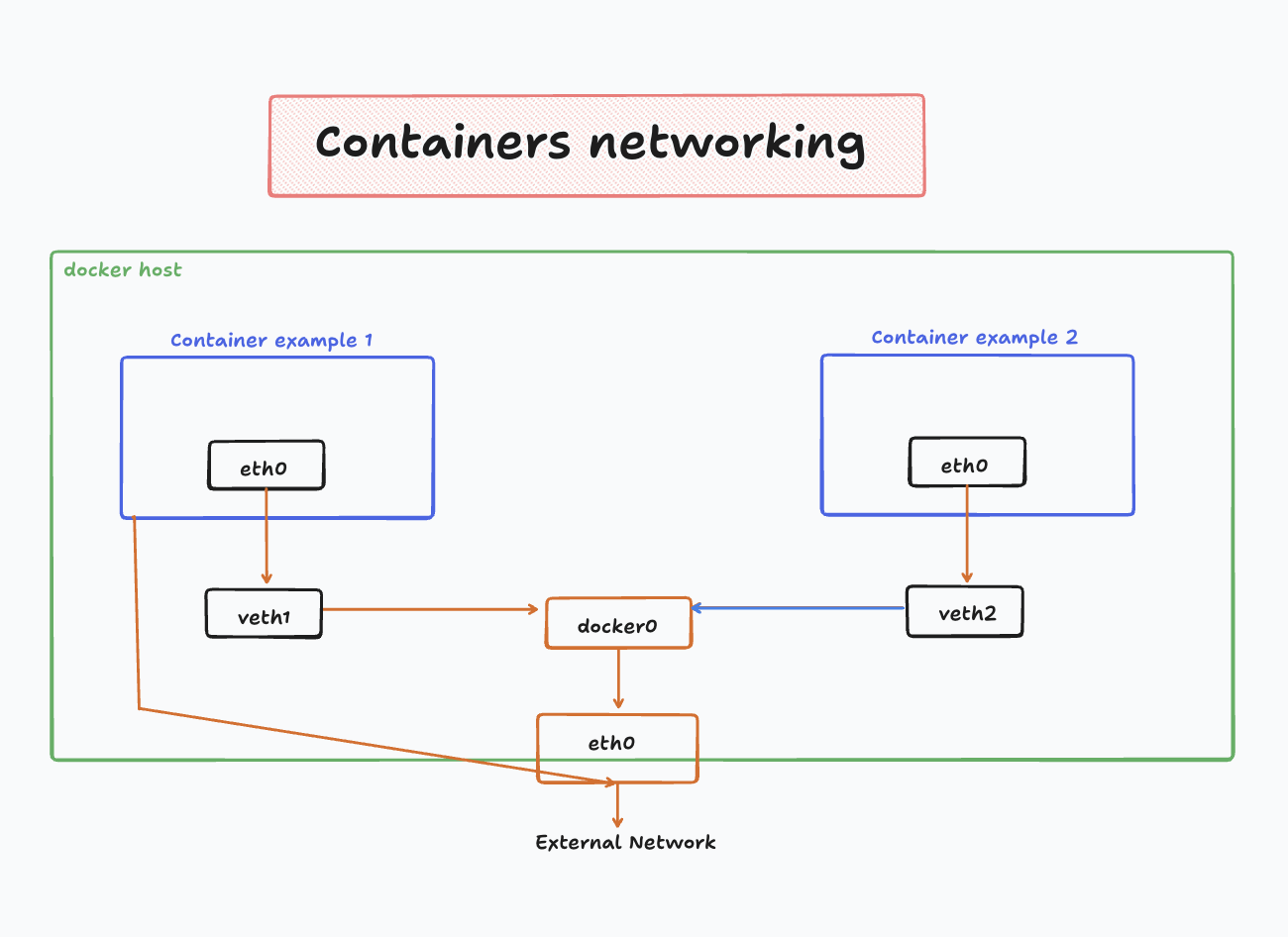
Here’s what each command does:
# List all networks on your machinedocker network ls
# Inspect a network (see which containers are on it, subnet, etc.)docker network inspect <network-name>
# Create a new custom networkdocker network create <network-name>
# Run a container on a specific networkdocker run --network my-network <image>
# Connect a running container to a networkdocker network connect my-network <container>
# Disconnect a container from a networkdocker network disconnect my-network <container>
# Delete a networkdocker network rm my-network
🔧 Create a Custom Network and Run Containers on It
This is where it gets powerful. Custom bridge networks let containers talk to each other by name (DNS resolution built in).
Step 1 — Create the network:
docker network create my-networkStep 2 — Run containers on it:
docker run -d --name app --network my-network node:22-alpinedocker run -d --name db --network my-network mongoStep 3 — Containers can now ping each other by name:
# From inside the app container, you can reach the db by nameping dbThis works because Docker’s built-in DNS resolves container names automatically on custom networks. On the default bridge, this doesn’t work — you’d need to use IP addresses directly.
💡 Best practice: Always create a custom network for your apps instead of using the default bridge. It’s cleaner and gives you name-based DNS for free.
✅ Quick Summary
| Task | Command |
|---|---|
| List networks | docker network ls |
| Inspect a network | docker network inspect <name> |
| Create a network | docker network create <name> |
| Run on a network | docker run --network <name> <image> |
| Connect to network | docker network connect <name> <container> |
| Disconnect from network | docker network disconnect <name> <container> |
| Delete a network | docker network rm <name> |
The 3 drivers you’ll use most:
bridge→ default, isolated, one machinehost→ no isolation, shares host networkoverlay→ multiple machines (Swarm)
📚 Further Reading
- Docker Networking Overview — Official Docker Docs
- Bridge Network Driver — How the default bridge works
- Overlay Network Driver — For multi-host setups