JavaScript Questions
1. Palindrome Checker
Given an integer x, return true if x is a palindrome, and false otherwise.
- Example 1:
Input: x = 121 Output: true Explanation: 121 reads as 121 from left to right and from right to left.
- Example 2:
Input: x = -121 Output: false Explanation: From left to right, it reads -121. From right to left, it becomes 121-. Therefore it is not a palindrome.
- Example 3:
Input: x = 10 Output: false Explanation: Reads 01 from right to left. Therefore it is not a palindrome.
Function Definition
/** * Function to check if a number is a palindrome. * @param {number} x - The integer to check. * @returns {boolean} - Returns true if the integer is a palindrome, otherwise false. */const isPalindrome = function (x) {  return x === +x.toString().split("").reverse().join("");};
// Example Usageconst res = isPalindrome(10);console.log(res); // Output: false
2. Fibonacci Number
Difficulty: Easy
Problem Description
The Fibonacci numbers, commonly denoted F(n), form a sequence called the Fibonacci sequence, such that each number is the sum of the two preceding ones, starting from 0 and 1. That is,
- F(0) = 0, F(1) = 1
- F(n) = F(n - 1) + F(n - 2), for n > 1.
Given n, calculate F(n).
Example 1
Input : n = 2
Output : 1
Explanation : F(2) = F(1) + F(0) = 1 + 0 = 1.
Example 2
Input : n = 3
Output : 2
Explanation : F(3) = F(2) + F(1) = 1 + 1 = 2.
Example 3
Input : n = 4
Output : 3
Explanation : F(4) = F(3) + F(2) = 2 + 1 = 3.
Function Definition
const fib = function (n) {  if (n <= 1) return n;
  return fib(n - 1) + fib(n - 2);};
Explanation
- Base Case :
- The function starts by checking if
nis less than or equal to 1. - If
nis 0 , the function return 0 - If
nis 1, the function return 1 - These are the base cases for the Fibonacci sequence and represent the first two numbers in the sequence.
- Recursive Case :
- If
nis greater than 1, the function calls itself twice, once with `
3. Missing Number
This algorithm is designed to find the missing number in an array of integers where the numbers range from 0 to n, but one number is missing.
Code:
/** * @param {number[]} nums * @return {number} */const missingNumber = function (nums) { const expectedSum = (nums.length * (nums.length + 1)) / 2; return expectedSum - nums.reduce((acc, num) => acc + num, 0);};Step-by-Step Explanation :
- Step 1: Calculating Expected Sum
const expectedSum = (nums.length * (nums.length + 1)) / 2;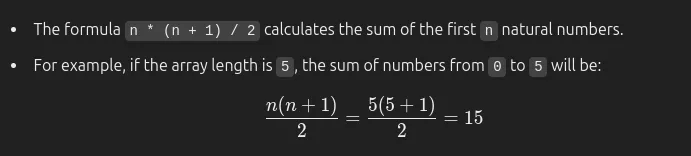
- Step 2: Calculating Actual Sum
nums.reduce((acc, num) => acc + num, 0);-
The reduce function is used to sum all the numbers present in the array.
-
For example, if the array is
[0, 1, 3, 4], the sum will be :0+1+3+4=8 -
Step 3: Finding the Missing Number
return expectedSum - nums.reduce((acc, num) => acc + num, 0);- The missing number is calculated by subtracting the actual sum from the expected sum.
- In the example above, if the expected sum is
15and the actual sum is8, then the missing number is:15−8=7
Summary :
- Expected Sum: We calculate the expected sum for numbers from
0tonusing the formulan \* (n + 1) / 2. - Actual Sum: Using the
reducefunction, we calculate the sum of the numbers present in the array. - Missing Number: The difference between the expected sum and the actual sum gives the missing number.
4. Capitalize Sentence
Problem:
Given a sentence, capitalize the first letter of each word.
Solution:
function capitalizeSentence(sentence) { return sentence .split(' ') .map(word => word.charAt(0).toUpperCase() + word.slice(1).toLowerCase()) .join(' ');}Example:
console.log(capitalizeSentence("hello world! this is javascript."));// Output: "Hello World! This Is Javascript."5. FizzBuzz
Problem:
Print numbers from 1 to n. For multiples of 3, print “Fizz” instead of the number. For multiples of 5, print “Buzz”. For numbers divisible by both 3 and 5, print “FizzBuzz”.
Solution:
function fizzBuzz(n) { for (let i = 1; i <= n; i++) { if (i % 3 === 0 && i % 5 === 0) { console.log("FizzBuzz"); } else if (i % 3 === 0) { console.log("Fizz"); } else if (i % 5 === 0) { console.log("Buzz"); } else { console.log(i); } }}Example:
fizzBuzz(20);6. Maximum Profit (Stock Trading)
Problem:
Given an array of stock prices, find the maximum profit you can achieve by buying and selling once.
Solution:
function maxProfit(prices) { let minPrice = Infinity, maxProfit = 0; for (let price of prices) { minPrice = Math.min(minPrice, price); maxProfit = Math.max(maxProfit, price - minPrice); } return maxProfit;}Example:
console.log(maxProfit([7, 1, 5, 3, 6, 4])); // Output: 5 (Buy at 1, Sell at 6)console.log(maxProfit([7, 6, 4, 3, 1])); // Output: 0 (No profit possible)7. Find Student in Array
This algorithm is designed to search for a student’s name in an array of student names. If the name is found, it will print the student’s name.
Problem Description
Given an array of student names and a target name to search for, check if the name exists in the array. If found, print the name; otherwise, do nothing.
Example 1
Input :
const studentDB = ["Saurabh", "Banti", "Raju", "Rajesh", "Dipali"];
findStudent(studentData, "Saurabh");
Output :
SaurabhExplanation : The name “Saurabh” is found in the array, so it is printed.
Example 2
Input :
findStudent(studentData, "Amit");Output :
(No Output)Explanation : The name “Amit” is not found, so nothing is printed.
Function Definition
/** * Function to find and print a student's name from an array. * @param {string[]} allStudents - Array of student names. * @param {string} studentName - The name to search for. */
const findStudentName = (data, name) => {  for (let i = 0; i < data.length; i++) {    if (data[i] === name) {      return data[i];    }  }  return false;};
// console.log(findStudentName(studentDB, "Raju"));
### Step-by-Step Explanation:
1. Input Parameters:
* allStudents: An array containing the names of all students.* studentName: The name of the student to find.

2. For Loop:
```js for (let i = 0; i < data.length; i++) { if (data[i] === name) { return data[i]; } }- The loop starts at index 0 and continues until the end of the array.
- i is used as the index to access each student’s name.
- Condition Check:
if (data[i] === name) { return data[i]; }- Checks if the current name in the array is equal to the studentName.
- If a match is found, it prints the name using console.log.
- Output:
- If the name is found, it prints the student’s name.
- If the name is not found, nothing is printed.
Example Usage:
const studentDB = ["Saurabh", "Banti", "Raju", "Rajesh", "Dipali"];
findStudent(studentData, "Saurabh"); // Output: SaurabhfindStudent(studentData, "Amit");   // No Output
Summary:
- The function iterates through the array using a for loop.
- It checks each name to see if it matches the given studentName.
- If a match is found, it prints the name.
- If no match is found, the loop ends without any output.