Introduction to Python
Python is popular programming language known for its simplicity and versatility. It’s widely used in web development, data analysis, artificial intelligence, scientific computing and more
Why Python
- Easy to Learn : Python has a clean and readable syntax, making it an excellent choice for beginners.
- Powerful and Flexible : Despite its simplicity, Python is very powerful. It supports various programming paradigms, including procedural, object-oriented, and functional programming.
- Wide Community and Libraries : Python has Large community and a rich ecosystem of libraries and frameworks, which make it easier to find support and tools for your project
Getting Started
To start coding in Python, you need to install python on your computer. You can download it from the official Python website.
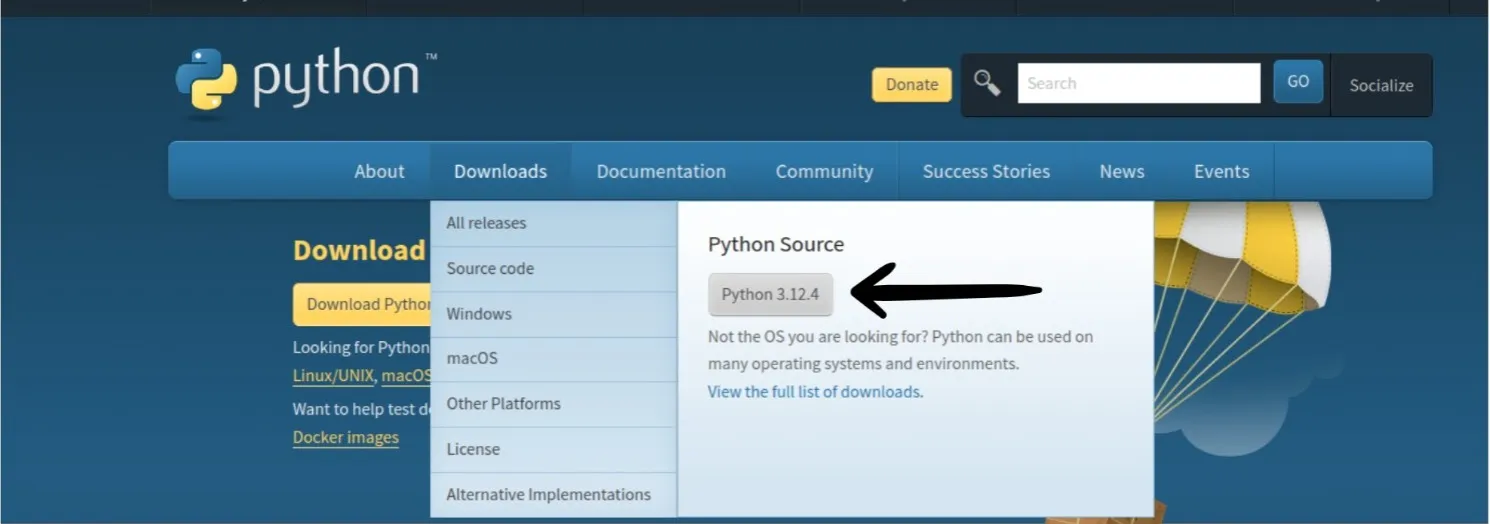
Its automatically detects your machine and gets you the suitable package for your machine.
Steps to Create and Run “Hello, World!” Program
1. Open a Text Editor
You can use any text editor to write your Python code. Some popular choices are:
- Visual Studio Code
- Sublime Text
- Atom
- Notepad (Windows) / TextEdit (Mac)
2. Write the Python Code
Create a new file with a .py extension and add the following code:
print("Hello, World!")3. Save the File
- Save the file with a
.pyextension, for example,hello_world.py.
4. How to Run the Python File
- Open a Command Line or Terminal.
- Navigate to the File Location.
- Run the Python Program
Type the following command to run your Python program:
python3 hello_world.py- If you are using Python 3, you might need to use:
If everything is set up correctly, you should see the following output.
Hello, World!Print Hero Names in Python
Here is an example of how you can print hero names in Python:
Write the Python Code
Create a new file with a .py extension and add the following code:
def print_hero(hero_name):    print(hero_name)
print_hero("Hulk")print_hero("Superman")print_hero("Spider-Man")
Save the File
- Save the file with a
.pyextension, for example,print_heroes.py - Open a Command Line or Terminal.
- Navigate to the File Location.
- Run the Python Program
Type the following command to run your Python program:
python3 print_heroes.pyIf everything is set up correctly, you should see the following output.
HulkSupermanSpider-Man