TypeScript Inner Working & Installation
To improve the image placement and make the README more organized, let’s ensure the image is aligned correctly with relevant content and doesn’t interrupt the logical flow. Here’s a refined version with suggestions for better image positioning:
TypeScript Inner Working
Description: Discussion about Python inner workings
This guide provides a basic understanding of how TypeScript works behind the scenes, starting from writing
.tsfiles to their execution in a JavaScript engine like V8.
1. TypeScript Source Code (.ts files)
- TypeScript is a superset of JavaScript that adds static typing and other advanced features.
- Developers write code in TypeScript files with the extension
.ts. - These files include type annotations, interfaces, and modern JavaScript syntax to improve code quality and reduce runtime errors.
2. Transpiling with tsc (TypeScript Compiler)
- The TypeScript code cannot run directly in browsers or JavaScript engines. It must be transpiled to JavaScript.
tsc(TypeScript Compiler) is the tool responsible for converting TypeScript into JavaScript files that browsers and Node.js can understand.- During the transpilation:
- Type annotations are removed.
- TypeScript ensures that type rules are respected, and it flags errors if there are type mismatches.
- The final output is JavaScript code in
.jsfiles.
3. JavaScript Code (.js files)
- Once the TypeScript code is transpiled, the resulting output is JavaScript code, which is identical to what developers write directly in JavaScript.
- The JavaScript code generated can run in any JavaScript environment—whether in a browser or on the server using Node.js.
4. Execution by the V8 JavaScript Engine
- The final JavaScript code is executed by a JavaScript engine like V8 (used in Google Chrome and Node.js).
- V8 takes the
.jsfiles, compiles them to machine code, and runs them. - This ensures that the application behaves exactly as expected, with the added benefit of having caught type-related issues during the development process via TypeScript.
Summary Flow
- Write: Code in
.tsfiles using TypeScript. - Transpile: Use
tscto convert TypeScript to JavaScript (.js). - Execute: Run the JavaScript code using the V8 JavaScript Engine (or any other JavaScript runtime).
Visual Overview
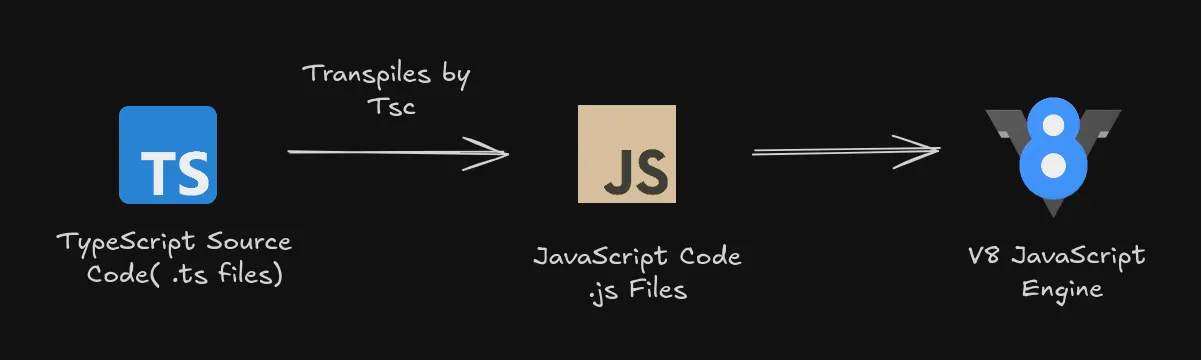
The image above shows the complete workflow from writing TypeScript to executing it in a JavaScript engine.
Installation and Setup
Step 1: Install TypeScript
You need Node.js installed. Then, install TypeScript globally:
npm install -g typescriptStep 2: Verify Installation
Check if TypeScript is installed:
tsc --versionStep 3: Create Your First TypeScript File
Create a file named index.ts with the following code:
let greeting: string = "Hello, TypeScript!";console.log(greeting);Step 4: Compile the TypeScript Code
Transpile the TypeScript file to JavaScript:
tsc index.tsThis will generate an index.js file with the compiled JavaScript code.
Step 5: Run the JavaScript Code
Execute the compiled JavaScript file:
node index.jsResources for Learning More
Conclusion
TypeScript improves JavaScript development with static typing, better tooling, and maintainable code. It’s easy to get started and can significantly reduce bugs in your applications.
Happy coding! 🎉