JWT Interview Questions
Practice these three questions in order. Start with the short answer, explain the example, and then try the follow-ups.
For password storage and database protection, see Hashing and Encryption Interview Questions.
Before you start: four simple terms
| Term | Easy meaning |
|---|---|
| Access token | A pass sent to an API to access protected data. |
| Refresh token | A separate credential used to get a new access token. |
| Expiry | The time after which a token must be rejected. |
| Revocation | The server blocks a token or session before expiry. |
The times in the examples are design choices, not rules for every application.
1. How would you secure JWT authentication? What if a token is stolen?
Interviewer: “You are using JWT authentication in a web app. How will you secure the tokens? Suppose someone steals a token while the user is still logged in.”
Answer you can say in an interview
I would use HTTPS, short-lived access tokens, and a securely stored refresh token. The server would verify tokens before accepting requests. If a token is stolen, an attacker can use it until expiry unless we block it earlier. To stop it earlier, I would block that access token on the server and revoke the related refresh tokens. This prevents both using the stolen token and getting new tokens through those refresh credentials.
First understand the normal login flow
- Login: The user enters their email and password.
- Get tokens: After checking the credentials, the server issues an access token and a refresh token.
- Call an API: The client sends the access token. The server verifies its signature, expiry, issuer, and audience before allowing access.
- Access token expires: The API rejects it. A valid refresh token can be used to get a new access token.
- Refresh session expires or is revoked: The user must log in again.
For example, an access token might last 15 minutes and a refresh session 7 days. These are example values; choose them for the application’s risk and session requirements.
Now answer the stolen-token follow-up
Interviewer: “But the stolen token still has ten minutes left. How do you stop it now?”
I would put its unique token ID in a server-side blocklist. On every protected request, the API checks whether that token is blocked. If it is, the API rejects it even when its expiry time has not arrived. I would also revoke the related refresh tokens.
Blocklist means a list of tokens that the server must reject. It is also called a denylist or blacklist.
Simple example: Rahul’s token expires at 10:15. At 10:05, it is copied. At 10:07, theft is reported and the token is blocked. Requests using that token are now rejected, including requests from Rahul’s own copy. He must authenticate again.
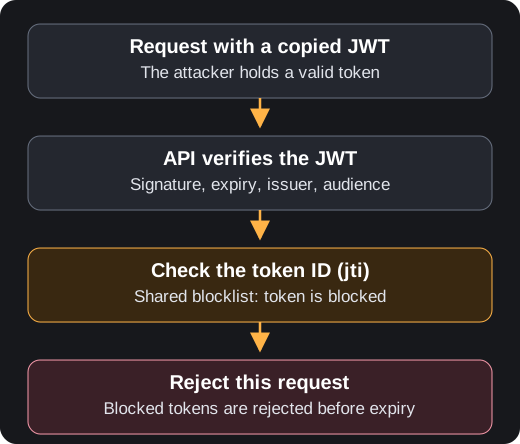
For implementation, the JWT has a unique jti claim, meaning token ID. Store blocked IDs in a shared store such as Redis, and keep each entry until the corresponding token expires. Every API server must enforce the check. OWASP describes blocking JWT IDs before expiry.
More interviewer follow-ups
“Does using a refresh token stop a stolen access token?”
No. Refresh tokens help obtain new access tokens. They do not invalidate an existing access token. Short expiry reduces the attack window; a blocklist can close it earlier after detection.
“What if we do not know it was stolen?”
An ordinary bearer token cannot reliably distinguish the original user from someone holding a copy. We reduce theft risk and limit token lifetime, but cannot promise to detect every theft.
“Where would you keep tokens in a browser?”
One design keeps the access token in memory and the refresh token in an HttpOnly, Secure cookie with suitable SameSite settings. HttpOnly prevents JavaScript from reading the cookie; it does not make the app immune to XSS. Cookie-based authentication also needs CSRF protection. OWASP explains cookie security.
“What if the refresh token is stolen too?”
Rotate it on use and detect reuse of old refresh tokens. Revoke the affected refresh-token family when reuse is detected. An attacker may succeed before detection; rotation does not block already issued access tokens by itself. RFC 9700 refresh-token guidance.
“Does a blocklist have a cost?”
Yes. It adds a shared-store lookup to protected requests. If the requirement is to block every access token from one login, a shared session record can be checked instead. Define cache invalidation and store-outage behavior; stale status can delay blocking.
Remember: prevent theft → keep access tokens short-lived → block compromised tokens → revoke refresh credentials.
2. The access token expires while the user is active. What happens next?
Interviewer: “The user is filling out a form. Their access token expires. Do we make them log in again? What if the refresh token is also expired or stolen?”
Short interview answer
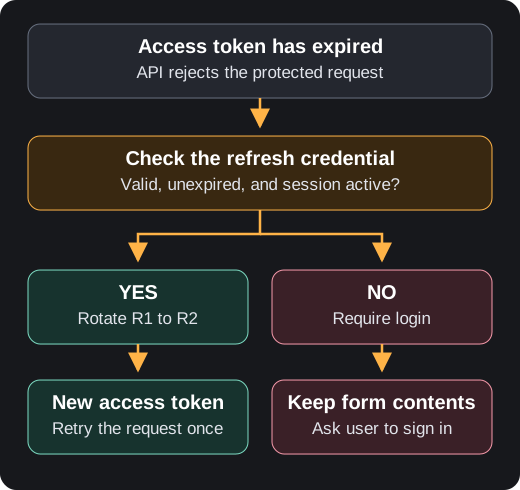
When an access token expires, the API returns 401. The client sends its refresh token to the refresh endpoint. If that token is valid and its session is active, the server returns a new access token and, with refresh-token rotation, a new refresh token. The client retries the failed API request using the new access token. If the refresh session has expired or been revoked, the user must log in again.
Understand it with an example
A1 and A2 are access tokens. R1 and R2 are refresh tokens. The numbers just mean old and new.
- Maya logs in and receives A1 + R1. A1 lasts 15 minutes; her refresh session can last up to seven days in this example.
- At minute 16, the browser sends A1 to an API. A1 has expired, so the API returns 401 Unauthorized.
- The browser sends R1 to
/refresh. The server checks the refresh token and its session. - If valid, the server returns A2 + R2 and invalidates R1. This replacement of R1 with R2 is refresh-token rotation.
- The browser replaces its stored tokens and retries the failed API request once using A2. R2 is kept for the next refresh.
- If refreshing fails because the refresh session has expired or been revoked, preserve the form contents and ask Maya to log in again.
API request with expired A1 → 401Refresh request with valid R1 → new A2 + new R2; R1 becomes invalidRetry the original API request with A2 → successWhich token goes where? Normal protected API requests use the access token. The refresh endpoint uses the refresh token. Receiving two new tokens does not mean both are required to authorize each API request.
Do not refresh on every 401 without checking the reason. An expired access token can be refreshed through an active session; a revoked refresh session requires login. RFC 6750 explains expired-token responses and retrying with a new access token.
Follow-up questions
What is refresh-token rotation?
When refresh token R1 is used, the server invalidates it and issues R2. Store their relationship so reuse of R1 can trigger revocation of the session’s refresh-token family, including R2. Rotation and reuse detection help contain refresh-token theft. RFC 9700 describes this approach.
Does issuing A2 automatically invalidate the old access token A1?
No. Refresh-token rotation invalidates R1, not A1. If A1 has expired, the API rejects it with 401. If A1 has not expired, it can still work unless the server separately blocks it or revokes its session and the API checks that status.
Example: A1 expires at 10:15. Maya refreshes early at 10:05 and receives A2 + R2. R1 is now invalid, but A1 can still work until 10:15 unless separately blocked. This is why rotation alone does not stop a stolen, unexpired access token.
What if the attacker uses R1 first?
The attacker may get new tokens before reuse is detected. Rotation does not magically prevent the first malicious use. When the legitimate client later presents R1, reuse detection can revoke the refresh family. Blocking already issued access tokens also needs the revocation check from question 1.
Should activity keep the user logged in forever?
No. Set an absolute session lifetime and, if needed, an idle timeout. Once the refresh session is expired, require login. Token rotation should not silently remove that absolute limit.
What if two requests try to refresh at the same time?
Have the client share one refresh operation. Make server-side rotation atomic, so one token cannot create two independent successors. Plan for retries and multiple tabs so ordinary request races are handled deliberately.
Mistake to avoid: accepting an expired access token because the user is active, or trying to refresh endlessly after the refresh session has expired.
3. How do logout and “log out from all devices” work with JWTs?
Interviewer: “The user clicks logout, but their JWT has ten minutes left. Is deleting it from the browser enough? How would you log them out everywhere?”
Short interview answer
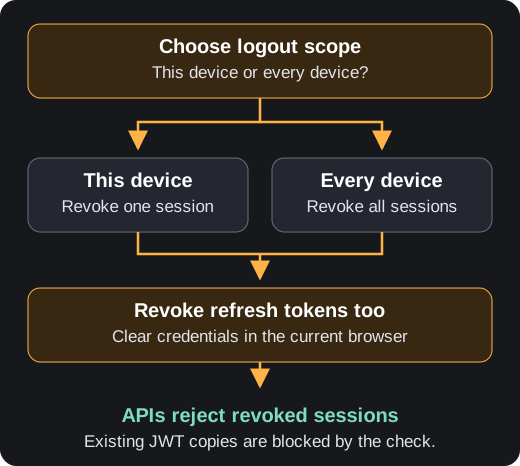
Deleting the browser’s token clears that copy. A stolen copy can still work unless the server blocks it. For logout, I would revoke the current session and its refresh tokens, then clear browser credentials. For logout from all devices, I would revoke every session belonging to the user. APIs must check revocation to reject existing access tokens immediately.
Understand it with an example
Maya is logged in on a phone and a laptop. Each device has its own session ID. Logging out on the laptop revokes only the laptop session. “Log out from all devices” revokes both.
Follow-up questions
Is revoking only the refresh token enough?
It stops new access tokens from being issued through that refresh credential. Existing access tokens remain usable until expiry unless the API checks session revocation or a token denylist. OWASP explains the JWT logout gap.
How does logout work across several API servers?
Use a shared session store that every API checks. A revocation saved only in one server’s memory will not reach the others. Define how cached status is invalidated; a stale cache weakens the promise of immediate logout.
What is the tradeoff?
Checking shared state adds latency and an availability dependency. Checking only JWT signature and expiry avoids that lookup, but leaves a window before expiry. State the requirement: does this product need immediate blocking? If so, define store-outage behavior; sensitive endpoints should reject access when session validity cannot be confirmed.
Mistake to avoid: “JWTs are stateless, so logout is impossible.” Immediate revocation is possible by adding server-side state.
Quick revision before the interview
| If the interviewer asks… | Start with… |
|---|---|
| “A token is stolen but still valid?” | A valid copy can work. Block the access token and revoke related refresh tokens. |
| “The access token expired?” | Reject it. Refresh only through a valid, active refresh session. |
| “The user logged out?” | Clear client credentials and revoke the server session and refresh tokens. |
Practice pattern: describe the risk → explain the control → walk through an example → mention the tradeoff.
Article compared while preparing these answers
GeeksforGeeks: JWT authentication with refresh tokens covers login, short access-token expiry, the refresh endpoint, and cookie storage. This page starts with that normal flow, then answers the separate stolen-token follow-up.
The article is a reference for explanation style, not one answer expected by every Indian interviewer. Security details are checked against the linked OWASP guidance and RFC 9700. The answers and examples here are written for this guide.